
- Gifts & Party Decorations
- Phone Accessories
- Photo & Video
- Computers & Electronics
- Sports & Fitness
- Beauty & Health
- Car & Motorcycle Accessories
- Bicycle Accessories
- Home & Living
- Garden & Outdoor
- Baby & Kids Products
- Games, Hobbies & Leisure
- Travel & Outdoor Activities
- Pet Supplies
- Discounted Items & Products with Defects
MacBook accessories
MacBook accessories include Tech-Protect and Uniq products, alongside cases for MacBook Air, Pro and Neo, screen protectors and keyboard films. They suit shoppers who want to cover a particular part of a laptop rather than choose an accessory by appearance alone. Check the exact MacBook model, screen size and release year against the product description before selecting a case or protector.
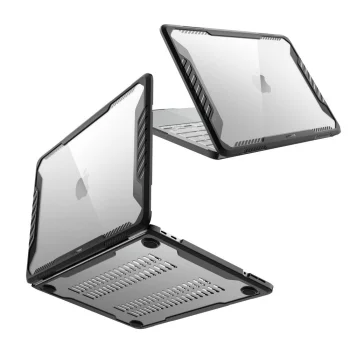
MacBook accessories cover different parts of a laptop: cases fit around the body, screen protectors cover the display, and keyboard films are intended for the keyboard. This category includes products for MacBook Air, MacBook Pro and MacBook Neo, with Tech-Protect and Uniq among the listed brands. Tech-Protect SmartShell cases appear for several Air and Pro sizes, while screen accessories include 3mk FlexibleGlass Lite. These product types serve different purposes, so the part of the laptop you want to cover is a useful starting point.
How to choose MacBook accessories
Identify whether your laptop is a MacBook Air, Pro or Neo before comparing accessories. Then check its screen size, release year and any model code or M-series designation stated in the product name. A MacBook Air 13" M2 / M3 case, for example, has a different model description from a MacBook Air 13" (2018/2020 M1) screen protector. Even where two listings share a screen size, do not assume that their model fit or intended use is the same. Consult the compatibility details for the individual accessory.
- Body cases: Select a case labelled for your MacBook model and size. Air, Pro and Neo are distinct model families in the product names.
- SmartShell cases: Tech-Protect versions are listed for MacBook Air 13" and 15" and MacBook Pro 14" and 16". Compare the stated years and processor designations as well as the size.
- Screen protectors: Match a protector to the named display model and size. A MacBook Air screen protector should not be treated as a MacBook Pro accessory based on size alone.
- Keyboard films: Check the MacBook model and any listed model codes. Screen size by itself does not establish keyboard-film compatibility.
- Colour and finish: Case descriptions include transparent and matte options. Confirm model fit before choosing an appearance.
For everyday use, compare MacBook accessories by the laptop part they cover. Look for a model-specific case for the body, a matching protector for the screen or a keyboard film with an appropriate model designation. Each type needs its own compatibility check.
Frequently Asked Questions
How do I check whether a case fits my MacBook?
For a MacBook case, match the Air, Pro or Neo model, screen size, release year and any model code or M-series designation given in the product details.
What is the difference between a MacBook case and a screen protector?
A MacBook case covers the laptop body, while a screen protector is intended for the display. Check compatibility separately for each accessory.
Will a MacBook Air 13" keyboard film fit every Air 13" model?
A MacBook Air 13" keyboard film should not be selected by screen size alone. Compare the specific model and any model codes in the product description.
Does a MacBook Pro 14" case fit a MacBook Pro 16"?
MacBook Pro 14" and MacBook Pro 16" cases are listed for different sizes. Choose a case whose model and size designation match your laptop.


