
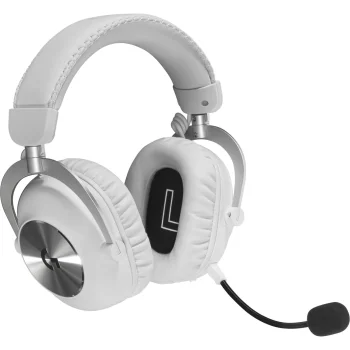
Turtle Beach Stealth 600 GEN3 PS wireless gaming headset, white



Delivery options to:
Choose countryThe Turtle Beach Stealth 600 GEN3 PS is a white wireless gaming headset with 50 mm Nanoclear drivers and up to 80 hours of battery life. It offers low-latency 2.4 GHz audio through a USB-A dongle alongside Bluetooth 5.2.
Connections and controls
The QuickSwitch button switches between radio and Bluetooth connections. The headset is compatible with PlayStation, Xbox, PC, Nintendo Switch, Steam Deck and Bluetooth-compatible mobile devices. An alternative wired audio connection is not supported.
- Microphone: flip-to-mute operation with AI-based noise cancellation.
- Audio adjustment: the Swarm II desktop and mobile app provides a 10-band EQ and microphone settings.
- Custom controls: assign functions to the wheel and mode button, with integrated EQ modes and Superhuman Hearing also available.
Comfort and charging
Memory foam ear cushions feature glasses-friendly technology. The headset has a flat, adjustable design, a lithium-polymer rechargeable battery, quick charging and a USB-C charging port.
| Acoustic design | Closed |
|---|---|
| Headphone frequency response | 20–20 000 Hz |
| Driver diameter | 50 mm |
| Maximum battery life | 80 h |
| Battery type | Lithium polymer |
| Power supply | Rechargeable battery |
| Bluetooth version | 5.2 |
| Type | Gaming headset |
| Signal transmission | Radio / Bluetooth |
| Alternative wired connection | No |
| Integrated microphone | Yes |
| Remote control | Yes |
| Colour | White |
| USB port | 1 × USB-C |
| Wireless connection | Low-latency 2.4 GHz; USB-A dongle |
| Compatibility | PlayStation, Xbox, PC, Nintendo Switch, Steam Deck, Bluetooth-compatible mobile devices |
| Ear cushions | Memory foam; glasses-friendly technology |
| App | Swarm II for desktop and mobile devices; 10-band EQ |
| EAN | 0731855031030 |
|---|
Can I connect the headset with an audio cable?
No, an alternative wired connection is not supported. Audio uses 2.4 GHz wireless or Bluetooth 5.2, while the USB-C port is for charging.
How do I mute the microphone and switch connections?
Flip the microphone up to mute it. The QuickSwitch button switches the headset between radio and Bluetooth connections.










 Gudri pirkumi vienuviet