
New
Uniq
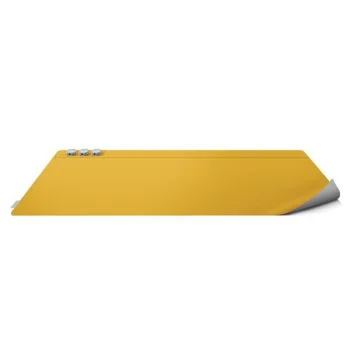
Uniq Hagen double-sided magnetic desk pad 67 × 35 cm, yellow/grey
Delivery in 5–12 business days
29.20 €
Mouse pads and desk mats include gel pads with wrist cushions, large mouse and keyboard mats, and gaming pads with LED RGB lighting from brands such as Lumivida, Wozinsky and Izoxis. They suit work, study and gaming setups. Choose according to available desk space, the room needed for mouse movements, and whether the keyboard will share the same surface.
Mouse pads and desk mats provide either a dedicated area for a mouse or a shared surface for a mouse and keyboard. Options include gel mouse pads with wrist cushions, extended desk mats, XXL gaming pads and versions with LED RGB lighting. Brands include Lumivida, Wozinsky, Tech-Protect, Rebeltec, Nanors, Izoxis, Liocat and Uniq. World map, space and honeycomb designs offer different visual styles for a desk setup.
Measure the available desk area before comparing formats. Consider both width and depth, especially when a keyboard will sit on the mat. Allow space beside the keyboard for your usual mouse movements. For a smaller mouse pad, focus on the area your hand actually uses. Compare the stated dimensions rather than relying on the XXL label alone, and consider thickness, a wrist cushion and lighting separately.
For work and study, base the choice on device placement and available surface area. For gaming, pay particular attention to mouse movement space. Wrist cushions, extended coverage and lighting are distinct features to compare according to how the desk is used.
Choose a mouse pad based on the available desk space and the area used for your usual mouse movements. For a mouse and keyboard mat, account for the keyboard footprint as well.
A gel mouse pad with a wrist cushion includes a padded support beside the mouse surface. Consider the cushion position in relation to your usual hand position.
XXL mouse pads can have different widths and depths. Compare the stated dimensions of each mouse pad rather than choosing by the XXL label alone.
Gaming mouse pads include versions with LED RGB lighting. Compare the dimensions and device layout as well as the lighting when selecting a mouse pad.
+371 20408041
info@motivs.lv
Duntes 56, Rīga, LV-1005, Latvija
Monday: 10:00 - 19:00
Tuesday: 10:00 - 19:00
Wednesday: 10:00 - 19:00
Thursday: 10:00 - 19:00
Friday: 10:00 - 19:00
Saturday: Closed
Sunday: Closed
 Gudri pirkumi vienuviet
